
Updates may require affected participants to complete new verification or confirmation tasks before the organization’s governance information is considered current. ChainIT reopens only the portions of onboarding affected by the change.
Where to Make Changes
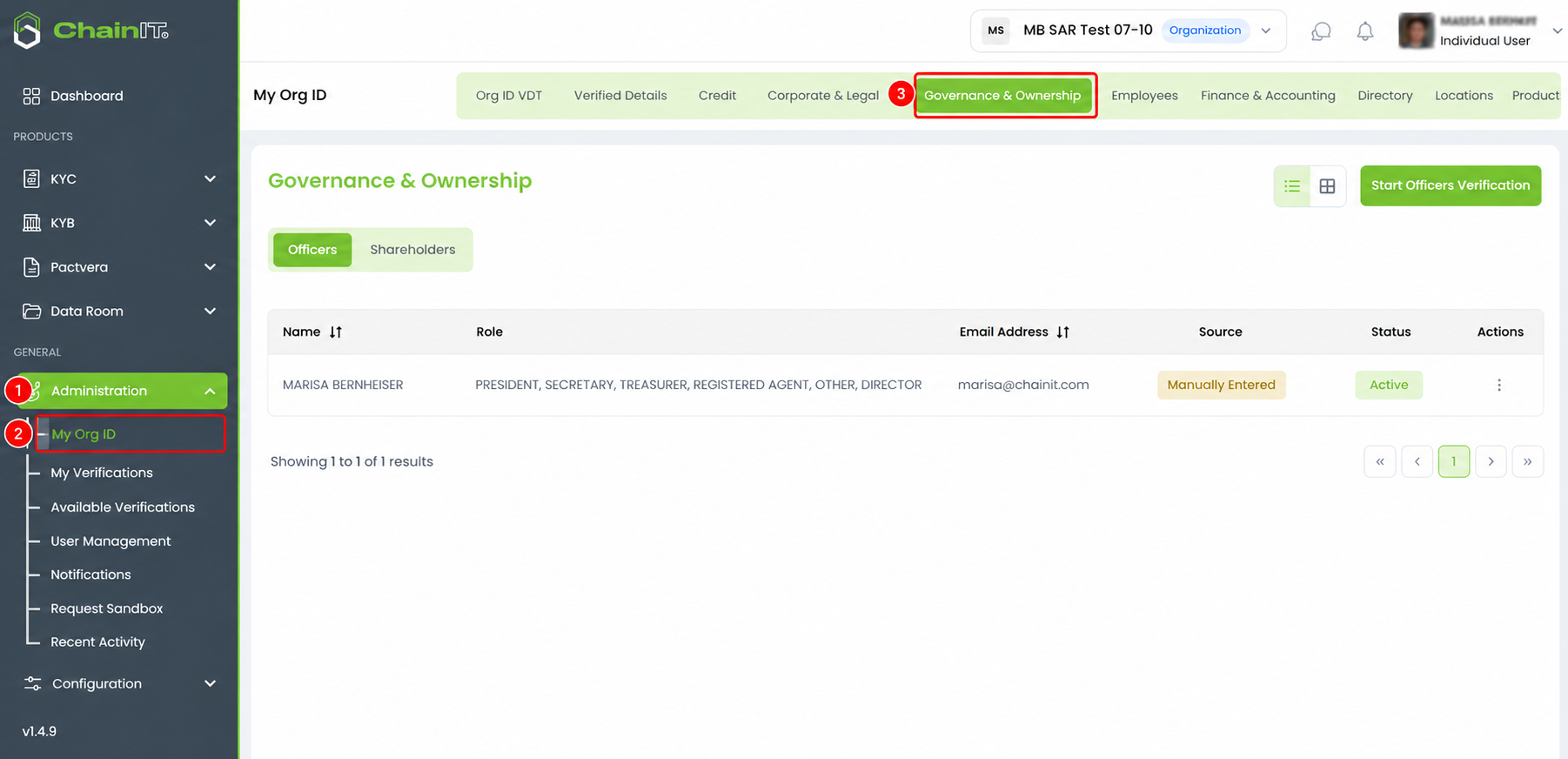
- Go to Chainit.com and log in to the portal.
- Navigate to Administration.
- Select My Org ID.
- Open Governance & Ownership.
From this page, you can begin an officer update or update ownership information.
Updating Officers
Use this process when you need to add an officer, correct officer information, or make another change to the organization’s current officer list.
-png.png?width=1809&height=869&name=ChatGPT%20Image%20Aug%2027%2c%202026%2c%2004_35_03%20PM%20(1)-png.png)
- From Governance & Ownership, select Start Officers Verification.
- Review the current officer information.
- Add or update officers as needed.
- Enter the correct email address and applicable role or roles for each officer.
- Review the updated information and submit it.
Depending on the change, affected officers may need to create or connect their ChainIT ID and complete verification.
Changes to the officer list reactivate the applicable officer-verification step. The required ownership or authority confirmation may also need to be completed again so the organization’s governance record reflects the updated officer information.
Updating Ownership
Use this process when you need to add an owner, correct an ownership percentage or contact detail, remove incorrect ownership information, or make another ownership change.
-png.png?width=1813&height=867&name=ChatGPT%20Image%20Aug%2027%2c%202026%2c%2004_35_03%20PM%20(2)-png.png)
- From Governance & Ownership, select the Shareholders tab, and click Update Ownership Verification.
- Review the current ownership information.
- Add, remove, or update owners as needed.
- For each owner, confirm the requested information, such as:
- Owner name
- Whether the owner is an individual or organization
- Ownership percentage
- Email address, when required
- Review the updated ownership information and submit it.
Updates to the shareholder or ownership list reactivate the applicable ownership-verification process. Required ownership, officer-authority, or corporate-owner confirmations may need to be completed again.
Correcting an Incorrect Invitation
If you entered an incorrect email address when adding an officer or owner, update the person’s information through Governance & Ownership rather than continuing with the incorrect invitation.
For an ownership correction:
Administration → My Org ID → Governance & Ownership → Shareholders → Update Ownership Verification
Correct the email address and resubmit the ownership information. Follow any additional verification or confirmation steps shown in ChainIT.
If the Ownership Change Affects Beneficial Ownership
The default beneficial ownership threshold is 25%.
If an ownership update causes an individual to meet or no longer meet the applicable threshold, ChainIT may require different ownership and authority steps. Organizations with no owner meeting the threshold may be asked to identify a Controlling Party.
Simply follow the tasks shown in the ChainIT portal after submitting the update.
What Happens After an Update?
ChainIT does not require the organization to repeat the entire onboarding process.
Only the affected portions are reopened. For example:
- Officer changes can reopen officer verification and related authority confirmation.
- Ownership or governing-document changes can reopen ownership verification and the related confirmations.
- Changes to user roles or permissions are handled through the separate role-assignment and officer-approval process.
Your organization’s governance information is current once all newly required tasks have been completed.